How to Play Riftbound Online – League of Legends TCG


Heya everyone! Riftbound, the League of Legends trading card game, is designed as a physical game meant to be played in person. But let’s be honest, many of us prefer battling it out from the comfort of our own rooms, especially with friends across the globe. That’s why a digital way to play has always been in high demand.
While there’s currently no official digital client for Riftbound, the community has stepped up! You can play the game online using Tabletop Simulator or Pixelborn!
1- TCG Arena
TCG Arena is the easiest way to jump right into playing Riftbound online. There’s no need to download anything — just visit the TCG Arena’s website, build your deck, and start playing instantly.
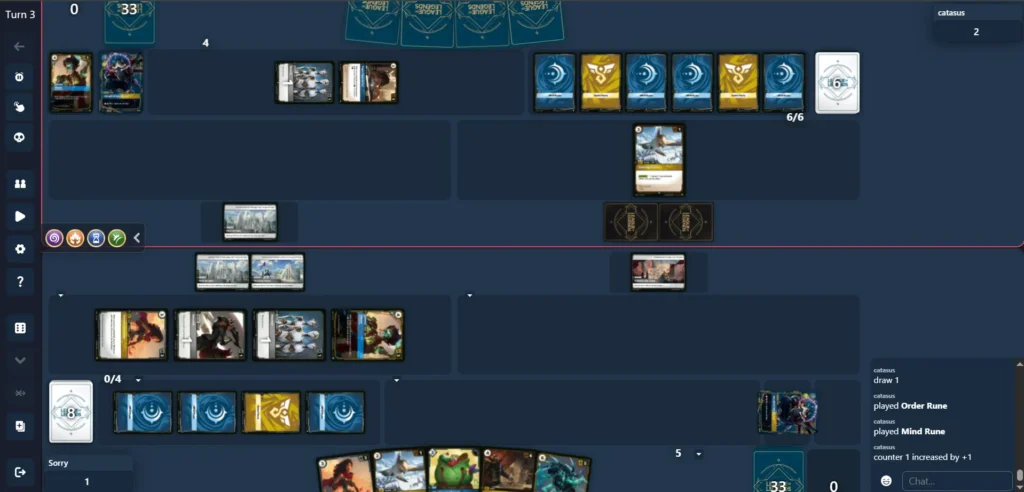
You can create your own deck in the Deck section or import one from our community decks by clicking the Text Code. Once you’re ready, head to the Play section, start a match, and use the Connect with Other Players option to share your game ID so your friend can join your lobby.
2- Table Top Simulator
Tabletop Simulator (TTS) is a PC game on Steam that lets players simulate and play almost any board or card game in a 3D virtual environment. You can purchase it on Steam here.

To download the Riftbound mod, head to the Tabletop Simulator page on Steam and click the Workshop tab. This will open a collection of mods for various games. Use the search bar to look for “Riftbound” by Willow. Be sure to select the latest version, not the Legacy one. Once you’ve found it, click Subscribe to add the game to your Tabletop Simulator library.


Once you’ve subscribed, launch Tabletop Simulator through Steam. From there, you can choose to join a server, create one for you and your friends, or play in single-player mode.
On the top of the screen, you can click on Games for the pop-up to appear, head to the Workshop section, and choose Riftbound to load it up.

And that’s it—you’re in the game! You can start exploring, testing things out, or playing with your friends and the community.
If you’re looking for people to play with or have questions about the mod or the game itself, be sure to join the Riftbound Community Discord Server!
3- Pixelborn

Initially, Pixelborn used to be a Lorcana simulator, but Pavel has been hard working on a Riftbound client! You should join their discord server to stay up to date on any client updates that come out.
Download Pixelborn

You can download the Pixelborn client here. Keep in mind that the Google Drive link could change in the future; if so, you can join the Pixelborn Discord server for the latest link.
Extract the files using a tool like 7zip.
Open the extracted folder and launch Pixelborn.exe. You then need to create an account to get into the game!
Download Card Images
So Pixelborn doesn’t automatically download the card images, so you will have to do it manually. Click the Settings icon in the upper-right corner. Then, in field provided, paste the image link. To get the image link, go to the Pixelborn Discord server, general channel, and check Pinned Messages. The link should look like this: https://archive.org/download/PBImg/Key/EN/S001.zip
After you’ve pasted the link in the client, hit update and wait. You might need to restart the client after you’re done downloading the images.